Treadmill Incline Motor Clicking But Not Moving?
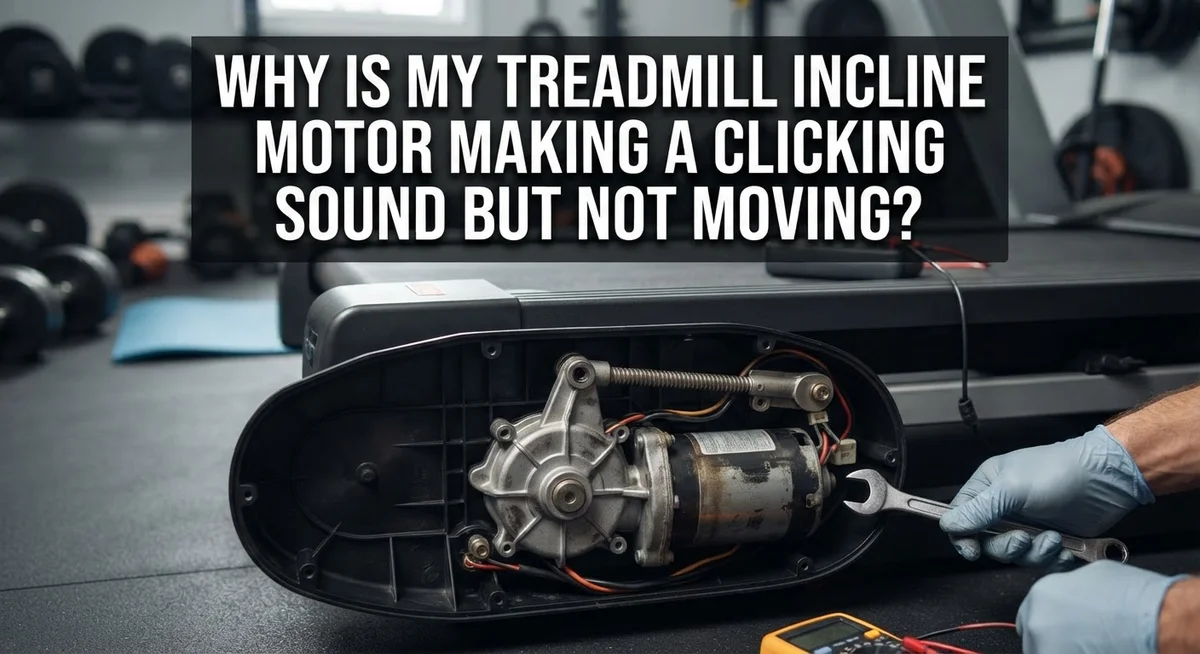
Your treadmill’s incline motor makes a weird clicking sound. But the incline does not move at all. This is annoying, especially mid workout.
You start to wonder if something is broken. Or maybe it is just a small fix you can handle yourself.
The good news is that clicking sounds often point to a few common issues. These include motor controller problems, worn gears, or debris stuck inside the motor. Sometimes it is as simple as belt misalignment.
This article breaks down why your incline motor clicks but refuses to move. We will walk through the core causes behind this frustrating noise.
In a Nutshell
- Clicking sounds usually mean a mechanical or electrical issue. The motor tries to work but something blocks it.
- Check the motor controller first. A failing controller often causes clicking without any incline movement.
- Look at the drive belt. Loose, misaligned, or worn belts can create clicking noises against the rollers.
- Inspect for debris or dirt buildup inside the motor housing. Dust and grime can jam small parts and stop movement.
- Watch for worn gears inside the incline motor. Old gears click and grind but fail to turn smoothly.
- Notice if noise changes during speed changes or heavy load. This helps you pinpoint the real cause faster.
- Avoid running the treadmill at full speed if you already hear clicking. This can cause more damage.
- Regular cleaning and belt checks prevent most of these problems. A little upkeep saves you from bigger repairs later.
- If basic checks don’t fix the clicking, it may be time to call a professional for a deeper look.
How the Incline Motor System Works
Your treadmill’s incline motor system is actually pretty simple in design. It uses an electric motor connected to a drive belt that pulls the incline deck up and down.
Here’s how it works. The motor receives power from your treadmill’s control board. When you press the incline button, the controller sends an electrical signal to the motor. The motor then spins a shaft that turns gears inside the incline mechanism.
These gears connect to a belt or cable system. This system physically lifts or lowers the front of the treadmill deck. The motor controller acts like a traffic cop. It tells the motor when to start, stop, and how fast to turn based on your inputs.
The drive belt is critical here. It transfers the motor’s spinning power to the actual incline mechanism. When everything works right, you press a button and the deck smoothly tilts up or down within seconds.
Clicking sounds happen when something breaks this smooth process. The motor might spin, but the belt doesn’t move. Or the gears inside get stuck. Debris or dirt can jam the system. Worn gears create friction that produces clicking noises.
The motor controller can also fail over time. It might send power to the motor, but the motor can’t complete its job. You hear clicking because the motor tries to turn but meets resistance it can’t overcome.
Think of it like a car engine with a dead battery. The starter motor clicks repeatedly but the engine won’t turn over. Your treadmill works the same way.
Understanding this basic system helps you spot problems faster. You know the motor, belt, gears, and controller must all work together. When one part fails, the whole incline system breaks down. This knowledge guides you toward the right diagnostic steps.
Common Causes of Clicking Without Movement
A clicking sound without movement usually points to one of several mechanical or electrical problems. Understanding these causes helps you decide whether to fix it yourself or call for help.
Motor controller failure is a top culprit. The controller sends electrical signals to the incline motor. When it fails, the motor clicks but cannot complete its movement cycle. This happens because the electrical connection breaks down over time from repeated use and heat exposure.
Worn gears inside the motor also cause clicking without movement. Gears have teeth that mesh together smoothly. When these teeth wear down or break, the motor spins but cannot transfer power to move the incline. You might hear a grinding or clicking sound as damaged teeth catch and slip.
Belt misalignment or looseness creates clicking noises too. The drive belt connects the motor to the incline mechanism. If the belt sits off center or hangs too loose, it rubs against the motor housing or pulleys. This friction produces clicking sounds while the motor runs but the belt stays stuck.
Debris and dirt buildup inside the motor housing is another frequent problem. Dust, lint, and small particles accumulate over months of use. These particles jam the motor’s internal parts or create friction points. The motor tries to spin but gets blocked by the debris.
Mechanical jams in the incline motor or resistance brake also prevent movement. A stuck component forces the motor to work harder. The clicking sound happens as the motor struggles against the blockage without actually moving the incline.
Each cause produces similar symptoms: clicking noises combined with zero movement. The key is identifying which problem you have. Start by checking if the motor controller has power, then inspect the drive belt for damage or misalignment, and finally look inside for debris or stuck parts.
Step-by-Step Diagnostic Process
Start by unplugging your treadmill from the wall outlet. This keeps you safe while you work. Wait at least five minutes before touching any parts.
Next, locate the incline motor. It’s usually near the front or side of the treadmill deck. Listen carefully to identify exactly where the clicking sound comes from. This helps narrow down the problem.
Check the motor controller box. Look for loose wires or corroded connections. Wiggle each wire gently to see if the clicking stops or changes. A loose connection often causes clicking without movement.
Inspect the drive belt carefully. Look for fraying, cracks, or uneven wear patterns. The belt should sit centered on the rollers. If it looks off center, that’s your culprit. A misaligned belt clicks against the rollers constantly.
Open the motor housing if your model allows it. Use a flashlight to peer inside. Look for dirt, dust, or small debris stuck in the gears. Accumulated dirt prevents smooth gear rotation. Use a soft brush or compressed air to gently remove buildup.
Manually rotate the incline mechanism by hand. Push or pull the treadmill deck up and down slowly. Feel for resistance or grinding sensations. These indicate mechanical jams or worn gears.
Check the belt tension next. The belt should have slight give when you press it. Too loose or too tight causes clicking. Refer to your user manual for proper tension specifications.
Listen again after each step. Does the clicking change or stop? This tells you which component needs attention.
If clicking continues after these checks, the motor controller likely failed. This requires professional repair. Don’t operate the treadmill further, as running a damaged motor causes more expensive damage.
Recognizing Related Symptoms and Warning Signs
When your treadmill incline motor clicks but doesn’t move, several warning signs appear before complete failure. Learning to spot these signs helps you catch problems early.
Listen for the clicking pattern. Does it happen only during speed changes? Does it occur under heavy load? Clicking that intensifies when you adjust the incline suggests motor controller strain. Clicking that stays constant points to worn gears or belt issues instead.
Pay attention to motor behavior during operation. If the motor runs but the belt stays still, you have a mechanical jam or controller failure. If the motor doesn’t run at all yet you hear clicking, the controller is likely dead. These differences matter for diagnosis.
Watch for overheating signs. Feel the motor housing after use. Is it hot to the touch? Excessive heat combined with clicking means the motor works too hard against resistance. This happens when gears wear down or belts misalign.
Notice any jerky or stalling motion. Your incline might move in short bursts instead of smooth adjustments. It might hesitate before moving at all. These symptoms suggest internal fatigue in the motor or gears.
Check for unusual sounds besides clicking. Whining or humming noises under load indicate motor strain. Grinding sounds mean gears touch metal parts incorrectly. These sounds often accompany the clicking noise.
Look at your belt alignment visually. Does the belt sit centered on the rollers? A misaligned belt creates clicking as it rubs against the frame. You might see visible wear marks on one side of the belt.
Debris accumulation also shows warning signs. Dust around the motor housing or visible dirt inside means buildup has started. This restricts movement and causes clicking sounds.
Track when symptoms started. Did clicking begin after heavy use? Did it follow a period of no maintenance? This timeline helps identify whether wear or sudden failure caused the problem.
Mistakes That Make the Problem Worse
Ignoring the clicking sound is the biggest mistake you can make. Many people assume the noise will go away on its own. It won’t. The problem gets worse each time you use the treadmill.
Running the motor at full speed when it’s already damaged causes serious harm. The internal components experience extreme strain. You risk burning out the motor completely, which leads to expensive repairs. Stop using the treadmill the moment you hear clicking.
Skipping regular cleaning allows dirt and debris to accumulate inside the motor housing. Dust particles block moving parts and create friction. This friction intensifies the clicking sound. Clean your motor every few months to prevent buildup.
Neglecting belt tension checks is another common error. A loose belt slips on the rollers and creates clicking noises. You might think the motor is failing when the real issue is simple belt adjustment. Check belt tightness regularly.
Forcing the incline mechanism by hand when it’s stuck makes mechanical jams worse. You could damage internal gears or the resistance brake system. If the motor won’t move, stop immediately instead of pushing harder.
Assuming the motor controller is fine without testing it leads to wasted time. A failed controller prevents the belt from moving even when the motor runs. You need to verify the controller status early in your diagnosis.
Waiting too long before seeking help compounds the problem. Early intervention prevents minor issues from becoming major failures. Address the clicking sound within days, not weeks.
Mixing water or harsh chemicals during cleaning damages motor components. Use only dry cleaning methods like compressed air or soft brushes. Moisture inside the motor causes electrical failures.
These mistakes transform a fixable problem into permanent damage. Stay proactive with maintenance and address clicking sounds immediately.
Preventive Maintenance Tips to Avoid Future Issues
Regular maintenance stops clicking sounds and motor failure before they start. The best approach is prevention rather than repair.
Clean your motor housing every month. Dust and debris collect inside over time and cause grinding or clicking noises. Use a soft brush or compressed air to remove buildup around the motor vents. Never spray water directly on electrical components. A dry cloth works best for wiping external surfaces.
Check your drive belt tension every three months. A loose belt slips on rollers and creates clicking sounds. Press down on the belt midway between rollers. It should move about half an inch. If it moves more, tighten it according to your manual. If it moves less, loosen it slightly.
Inspect belt alignment monthly. The belt should sit centered on all rollers. Misaligned belts rub against the frame and produce clicking noises. Look at the belt from the side while the treadmill is unplugged. If it drifts left or right, adjust the rear roller bolts to center it.
Lubricate the belt as recommended by your manual. Most belts need lubrication every three to six months. Proper lubrication reduces friction and motor strain. Use only the lubricant type your manual specifies.
Test your incline motor monthly without running. Unplug the treadmill, then manually raise and lower the incline by hand. It should move smoothly without resistance. Grinding or stuck feeling means mechanical issues are developing.
Keep your treadmill in a dry, cool location. Moisture and heat damage motor controllers faster. Avoid placing it near windows or in humid rooms.
Listen to your treadmill regularly. Learn what normal sounds are. Clicking, grinding, or whining noises mean something needs attention. Catching problems early prevents expensive repairs and keeps your motor working for years.
Troubleshooting Persistent or Recurring Clicking
When clicking persists or returns repeatedly, your treadmill is telling you something important. Recurring clicking means the underlying problem hasn’t been fully resolved. This happens when you address only the symptom instead of the root cause.
Start by checking your motor controller again. Controllers can fail partially, causing intermittent clicking that stops and starts. Test it during different incline levels to see if the clicking pattern changes. If clicking happens at specific angles, your controller likely has weak connections inside.
Inspect your drive belt with fresh eyes. Belts wear unevenly, and a worn section might click against the rollers only under certain conditions. Run your hand along the entire belt surface to feel for rough spots or raised areas. Belt damage often worsens gradually, making the clicking come and go.
Mechanical jams deserve careful attention. Debris can lodge in the incline motor and cause clicking on some days but not others. This depends on how the treadmill sits and whether vibration shifts the debris. Clean out all accessible areas around the motor housing using a dry brush or compressed air.
Check your belt tension regularly. Loose belts click more noticeably when the motor struggles to move them. Tension that’s too tight strains the motor and creates clicking as internal components fight against resistance.
Keep a maintenance log to track when clicking occurs. Note the time of day, outside temperature, how long the treadmill has been used, and what incline level you were at. Patterns emerge from this data. Clicking that happens only after extended use suggests motor overheating. Clicking that appears in cold weather points to belt stiffness or controller sensitivity to temperature.
If clicking persists after these checks, your motor controller likely needs professional evaluation. Recurring problems rarely solve themselves and usually indicate deeper electrical or mechanical issues requiring expert diagnosis.
Final Thoughts
A clicking incline motor is your treadmill’s way of asking for help. The sound itself is not the enemy. It is a warning sign that something needs your attention.
Most causes trace back to simple issues. Motor controllers wear out. Belts loosen or misalign. Debris builds up inside the motor housing.
None of these problems fix themselves. They only get worse with time and continued use. That is why quick action matters so much.
Start with the basics every time. Check your motor controller status first. Then inspect your belt for wear and proper tension.
Look for debris or dirt buildup next. This simple step solves many clicking issues. Clean motors run quieter and last longer.
Regular maintenance beats emergency repairs. Monthly checks catch small problems early. This saves you money and frustration later.
Do not ignore the clicking sound. Do not run your motor at full speed when damaged. These mistakes turn small issues into expensive repairs.
Your treadmill depends on smooth incline function for safe, effective workouts. A clicking motor disrupts your routine and your confidence in the machine.
Trust your ears and your instincts. If something sounds wrong, it probably is wrong. Your treadmill communicates through sound before it fails completely.
Professional help exists for good reason. Complex motor controller issues need expert diagnosis. Do not attempt repairs beyond your comfort level.
Simple fixes work for simple problems. Cleaning, alignment checks, and tension adjustments solve most clicking issues. Bigger problems need bigger solutions.
Stay proactive with your treadmill care. Listen for changes in sound. Address issues before they become serious mechanical failures.
Your treadmill serves you well when you serve it well too. Consistent care prevents most incline motor problems before they start. Small efforts now save big headaches later.
Frequently Asked Questions
What does a clicking incline motor mean if nothing moves?
Your motor controller likely has a problem. The clicking sound shows the motor tries to work, but something blocks movement. This could be a mechanical jam inside the incline system or a failed motor controller. Start by turning off your treadmill and checking for debris around the incline motor.
Why does my motor click only during certain times?
Clicking often happens when you change speed or increase the incline. Your motor works harder at these moments. Temperature changes can also affect motor performance. A cold garage or hot room may make clicking worse because metal parts expand and contract.
Can I still use my treadmill if the incline motor clicks?
No. Using it makes the problem worse. Continued operation damages internal gears and the motor controller further. Stop using the incline feature immediately. Running the treadmill on a flat surface is safer while you diagnose the issue.
Should I oil or lubricate the incline motor myself?
Only if your manual tells you to do so. Wrong lubricants attract dirt and cause more clicking. Dirty buildup is already a common cause of this problem. Adding the wrong oil traps debris inside the motor housing and makes clicking louder.
When should I call someone for help?
If clicking continues after you clean around the motor and check for jams, professional help is needed. Your motor controller may be failing. Experts can test the controller and replace worn gears safely.

Hi, I’m Sarah Hill — the founder and voice behind Heavy Lift Vault. I’m passionate about fitness, strength training, and health technology. I spend my time researching, testing, and reviewing workout equipment and health devices so you don’t have to guess. My goal is to deliver honest, detailed, and trustworthy reviews that help you invest wisely in your fitness journey.